Price terms as published
Each line is the vendor’s own wording, split from the price capture checked on 2026-09-21. Nothing here is rounded, converted or re-worded — the full sentences stay in the review below. Lines that carry only a price continue the plan named on the line above, in the vendor’s own order.
| # | Plan / term | Checked |
|---|---|---|
| 1 | Free (GPL-2.0-or-later) | 2026-09-21 |
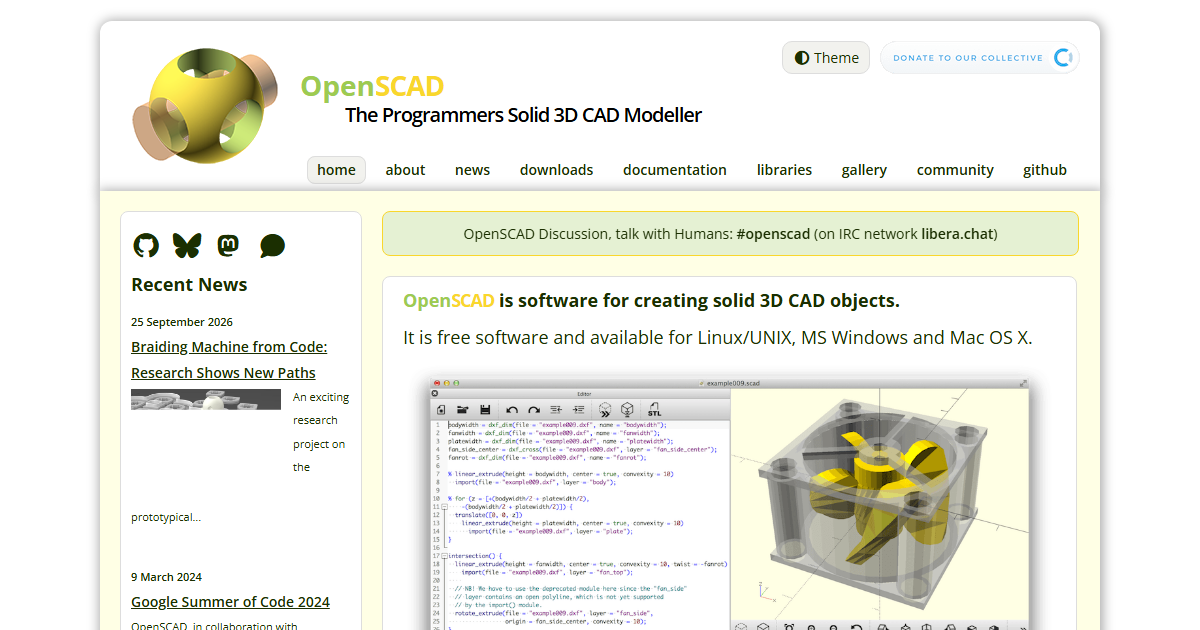
One-liner: OpenSCAD is free software for creating solid 3D computer-aided-design objects by writing a description in a scripting language instead of drawing with a mouse.
Verified facts (checked 2026-09-21)
| Attribute | Value | Source |
|---|---|---|
| GitHub stars | 10,249 (1,792 forks) | openscad/openscad via GitHub API, 2026-09-21 |
| License | GPL-2.0-or-later, with a CGAL linking exception | COPYING file in repository root |
| Last push | 2026-09-21 (same day) | GitHub API |
| Ownership | OpenSCAD project (community-developed) | openscad.org |
| Platforms | Windows, macOS, Linux | official downloads |
| Output formats | STL, OFF, AMF, 3MF, DXF, images | official documentation |
| License classification | “gpl-2+ with CGAL exception” | FSF Free Software Directory |
A note on the license, because automated tools get it wrong: GitHub’s API reports the repository as NOASSERTION, and some listings claim GPL-3.0. The actual COPYING file opens with the GNU General Public License version 2 text and an explicit permission to link with the CGAL library; the source headers say “version 2 of the License, or (at your option) any later version.” The Free Software Foundation lists it exactly that way. In practical terms: the program itself is free to use commercially, but modified versions distributed to others carry copyleft obligations.
What it actually does
You describe geometry in a C-like language — cubes, cylinders, spheres, extrusions, transforms, and boolean unions and differences — and OpenSCAD renders it, either as a fast OpenCSG preview or as a fully triangulated mesh suitable for export. Because the model is code, you get parameters, loops, and modules: change one variable and a whole family of parts updates.
What it doesn’t do
OpenSCAD is not a general mechanical-engineering suite. There is no assembly, no constraints solver, no drafting sheet set, and deliberately no click-and-drag modeling. People accustomed to graphical CAD tools face a real learning curve. It is strongest for parametric parts, functional 3D-printed components, jigs, and geometrically defined objects.
Who should use it
3D-printing enthusiasts, hardware hobbyists, and engineers who want version-controlled, parametric, repeatable models — especially when generating many variations of the same part. If you primarily need free-form surface design or a traditional drawing workflow, a graphical modeler is the better fit.
License text, repository stats and platform facts verified against primary sources on 2026-09-21. This entry follows our verification policy: every claim here was checked against primary sources, not copied from other reviews.
What the official site showed on 2026-10-16
The site’s own description, unchanged in tone for years, is “OpenSCAD is software for creating solid 3D CAD objects” — and the tagline under the logo adds the positioning that matters: “The Programmers Solid 3D CAD Modeller”. It is free software, available for Linux/UNIX, MS Windows and Mac OS X.
Everything the homepage links to
| Section | What is there |
|---|---|
| Home · About · News | project pages; news includes “Braiding Machine from Code” |
| Downloads | the release downloads plus “Other OSs and Versions” |
| Documentation | OpenSCAD User Manual and Tutorial on Wikibooks, plus a Cheat Sheet (“overview of modules and functions”) |
| Libraries | ready-made building blocks you can build on |
| Gallery | user designs |
| Community | IRC #openscad on libera.chat, Mastodon presence, GitHub |
| Books | a list of books — including the new English title “This is OpenSCAD” by Roberto Hamm |
| Playground | OpenSCAD Playground, directly in your web browser |
Three of those deserve a second look from a first-time reader:
- The playground lets you try the language in a browser before installing anything — the cheapest possible way to find out whether a code-driven CAD workflow suits you.
- The manual living on Wikibooks means the documentation is versioned and editable in public; combined with the cheat sheet it is a gentler start than most CAD tooling offers.
- Libraries as “ready-made building blocks” is the practical answer to “what do I model first” — you assemble parts rather than drawing faces.
The community section also points at where designs are shared: Printables, Thingiverse and Makerworld, plus a human-facing IRC channel — for a project of this age, an active IRC channel and a book still being published are more informative signals than any download counter.
What this means if you are choosing a CAD tool
OpenSCAD is the option you pick when you want parametric, diff-able, version-controllable geometry: models are scripts, so a part can be regenerated with a changed parameter and reviewed like code. The trade-off is the reverse of a GUI modeller — there is no direct manipulation of the mesh, and learning the language is the entry fee. The official site’s own materials (tutorial, cheat sheet, libraries, book) are the on-ramp; nothing on the homepage claims beginner-friendly drag-and-drop, and that honesty is the point.
Source note: all navigation labels, availability claims, links and titles above were read from openscad.org on 2026-10-16. Downloads were not installed for this entry, so the licence line in this page’s price table remains the verified record (checked on the date shown there).