Price terms as published
Each line is the vendor’s own wording, split from the price capture checked on 2026-09-29. Nothing here is rounded, converted or re-worded — the full sentences stay in the review below. Lines that carry only a price continue the plan named on the line above, in the vendor’s own order.
| # | Plan / term | Checked |
|---|---|---|
| 1 | Free (open source) | 2026-09-29 |
| 2 | upstream agent subscriptions billed separately | 2026-09-29 |
One-liner: Orca is an open-source Agent Development Environment (ADE) that lets you run multiple coding agents side-by-side — each in its own worktree — from a single dashboard. It’s a shell, not a model.
Verified facts (checked 2026-09-29)
| Attribute | Value | Source |
|---|---|---|
| GitHub stars | 80,555 | stablyai/orca via GitHub API |
| License | MIT | LICENSE file, verified same day |
| Created | 2026-03-17 | GitHub API |
| Last push | 2026-09-28 | GitHub API (daily commits) |
| Supported agents | Claude Code, Codex, OpenCode, Pi, oh-my-pi, Copilot CLI | README + docs |
| Platforms | macOS (Apple Silicon + Intel), Linux, Windows, iOS (TestFlight), Android (side-load APK) | GitHub Releases + docs |
| Price | $0 — free and open source | GitHub repo |
What “free” actually means
Orca itself costs nothing. The app is MIT-licensed, binaries are on GitHub Releases, and there’s no paid tier, no paywall, no credits system.
But Orca doesn’t include any AI models. From the README: “Run Codex, ClaudeCode, OpenCode or Pi side-by-side.” Each of those is a separate product with its own subscription:
- Claude Code — $20/mo (Pro) or $100/mo (Max)
- OpenAI Codex — $20/mo
- OpenCode — separate paid tier
- Pi — separate paid tier
If you’re running 5 agents in parallel worktrees, you’re paying for 5 upstream subscriptions. Orca is the free orchestra conductor; the musicians all charge separately.
What the marketing claims don’t say
- Multi-agent means multi-billing. The “fleet of parallel agents” pitch rarely mentions that each agent consumes its own subscription seat. A 5-agent workflow can easily be $100–200/mo in upstream costs before Orca itself costs a dime.
- Mobile is beta. The iOS app is TestFlight-only and Android is side-loaded APK (v0.4x range as of this writing). The desktop app is the primary experience.
- Account switching ≠ seat sharing. Orca has an account switcher for rate-limit tracking, but each agent provider’s terms still apply — sharing seats across a team violates most provider TOS.
Who should use it
Developers and small teams who already pay for multiple coding agents and want a unified dashboard to compare outputs, run split tasks, or manage parallel worktrees. If you only have one coding agent subscription, Orca’s main value prop (parallel fleets) isn’t fully unlocked yet.
*Repository stats and feature claims verified against primary sources on 2026-09-29.
What the official site showed on 2026-10-16
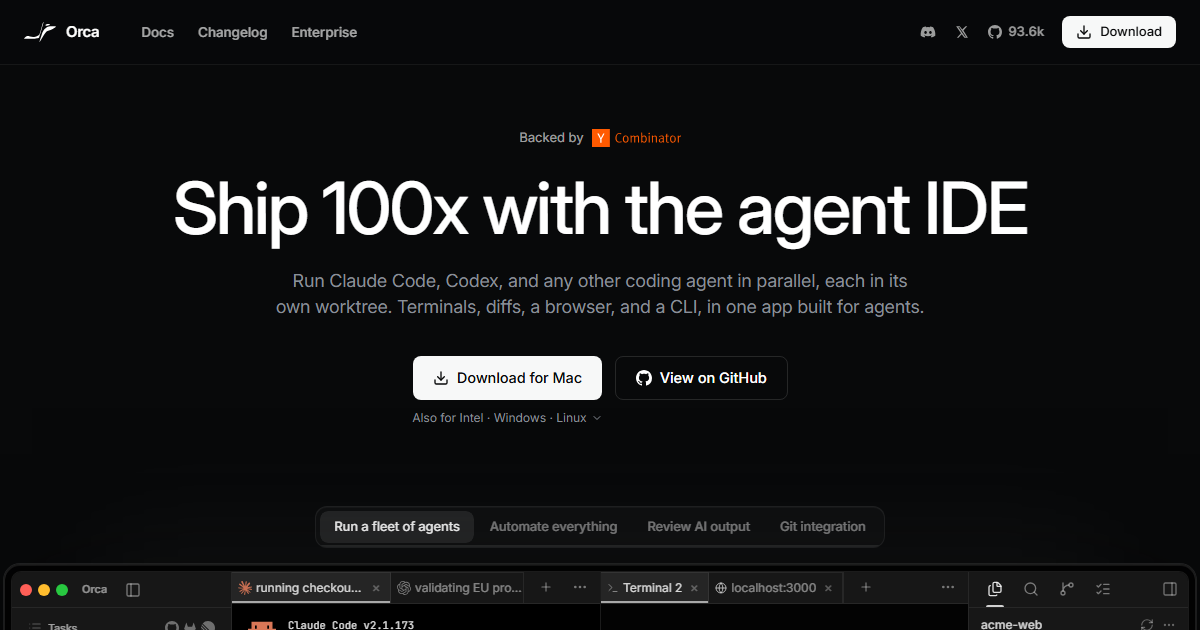
Orca calls itself “the agent development environment” and states the pitch in one line: run Claude Code, Codex and any other coding agent in parallel, each in its own worktree, with terminals, diffs, a browser and a CLI in one app built for agents.
Distribution and platforms, as published on 2026-10-16
| Item | Value on the page |
|---|---|
| Headline download counter | 93.7k (labelled “Download” in the header) |
| Desktop | macOS (Apple Silicon and Intel), Windows, Linux |
| Mobile | iOS App Store and an Android APK, described as “the mobile companion” |
| Source | “View on GitHub” links next to the desktop downloads |
| Header links | Docs · Changelog · Enterprise · “Backed by” |
Two details are worth more than the download number. First, the Android build is offered as a direct APK rather than only through a store — convenient, and a reminder to check the signature and source on every update. Second, an Enterprise link and a mobile companion suggest the product is aimed at teams running agents for long stretches, which is also how the marketing phrase “Ship 100x with the agent IDE” should be read: as positioning, not a measured figure.
Feature set named in the site’s own navigation
Run a fleet of agents · Automate everything · Review AI output · Git integration · Orca Tasks ·
Automations · Search (⌘J).
The homepage demonstrates all of this with a concrete project view: repositories acme-web,
checkout-flow-v2 and acme-internal shown with branches (feature/checkout-flow-v2,
checkout-baseline, feature/auth-session-refresh…), five agents running in parallel on named
tasks with durations — running checkout regression tests 49m, validating EU promo codes 3h,
updating checkout e2e snapshots 4h, reviewing tax calculation module 4h, revert cart rounding
to previous behavior 5h — alongside a Claude Code transcript (v2.1.173 · Opus · Claude Max)
showing a read → edit → shell-run loop with an actual diff on src/checkout/validators.ts and a
passing validators.test.ts (18).
That demo is the clearest statement of what Orca is for: many agents, one repo, separate worktrees, visible diffs and test results — the coordination layer, not the model.
What to verify before adopting it
- Worktree hygiene. Parallel agents in one repository is exactly the setup that produces colliding branches and half-merged edits. Check how Orca handles branch ownership, rebase conflicts and abandoned worktrees when an agent stops mid-task.
- Which agent is billed. The transcript shows
Claude Max, so the IDE itself is not the subscription — upstream tokens are (consistent with this page’s recorded price line: free, open source, agent subscriptions billed separately). - Mobile companion scope. A phone that can watch, and possibly approve, agent work is a privileged connection to a machine running shell commands. Check what approvals can be granted from the app and whether that path enforces the same permission prompts as the desktop.
Source note: download counter, platform list, navigation labels and the project demo text above were read from onorca.dev on 2026-10-16. No agent was run inside Orca for this entry.